Use Breakout Boards in Lucid to manage large class activities

HKUST faculty have access to Lucid, a powerful suite of whiteboarding tools, within Canvas. Beyond offering a flexible ideation workspace and fun icebreaker activities, Lucid also helps you engage large classes with its Breakout Boards feature, giving every student group a dedicated space to contribute and preventing your main board from becoming too chaotic. Here’s how to set it up.
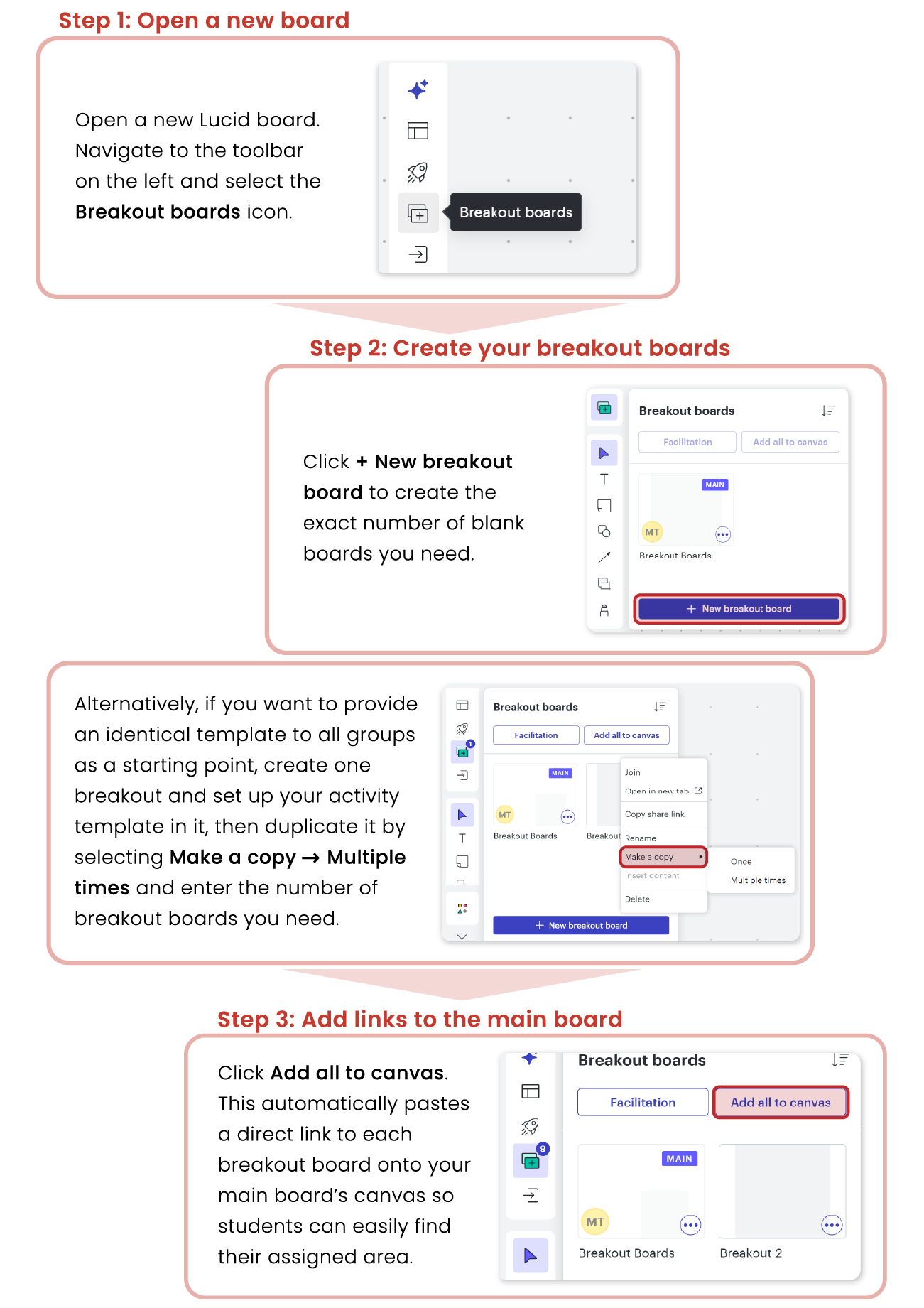
What happens next:
During the activity, students will start from the main board and click on the link for their assigned group breakout, which will take them to their dedicated workspace. You can drop in on different groups’ breakouts as the activity progresses and call students back to the main board at the end. To find out more, check out our recent newsletter feature. If you need any help, feel free to contact us at ceitet@ust.hk.
Look out for our upcoming workshop in late Summer/early Fall on creating Lucid activities to improve student engagement and collaboration in class!